
Introduction
Overview of OvoSale - Complete Cross-Platform POS Solution | Android & iOS Mobile Apps, Web, PWA-Desktop
OvoSale is a complete cross-platform POS solution designed to streamline business operations across multiple platforms. With dedicated mobile apps, a responsive web interface, and a PWA for seamless desktop usage, OvoSale offers a robust and feature-rich system for managing sales, inventory, purchases, reports, customers, suppliers, transactions, and human resources (HRM) effortlessly. Whether you run a retail store, a supermarket, or a small business, OvoSale equips you with the essential tools to enhance efficiency, manage your team, improve customer experience, and drive business growth.
This documentation provides a clear overview of the entire system, summarizing the core processes for easy understanding. The platform includes an intuitive admin panel and landing page, designed for seamless use without any coding expertise. It also integrates multiple automated online payment gateways, simplifying global transactions effortlessly.
Thank you for choosing OvoSale If you have any questions not covered in this documentation, please feel free to reach out to us via email. We’re here to assist and will respond as promptly as possible. Thank you again!
Flutter App Installation Requirements
Below are the requirements needed to set up and install a Flutter app.
The following installation requirements specify the essential setup for developing and running Flutter apps smoothly. Meeting these requirements helps ensure optimal performance and compatibility. Please confirm your environment meets these prerequisites before proceeding.
- Flutter SDK (latest stable version-> 3.32.8)
- Dart SDK (bundled with Flutter SDK-> 3.8.1)
- Android Studio (for Android development-> Narwhal | 2025.1.1))
- Xcode (for iOS development-> 16)
- Android Studio (Recommended IDEs)
- Java JDK 19 or later (for Android builds)
- Internet connection (for package and plugin downloads)
- Sufficient storage (at least 10GB free space)
- Minimum 8GB RAM (16GB recommended)
Installation
Application installation process
Setting up Flutter and Android Studio is straightforward and can be completed in a few simple steps. Our setup guide is designed to make the process seamless and efficient, ensuring a smooth start for your development environment.
Installation Steps:
- Download and Install Flutter: Visit the official Flutter installation page for the latest version and platform-specific setup instructions. Follow the guidelines for your operating system (Windows, macOS, or Linux) to complete the installation.
- Set Up Android Studio: Android Studio is required for developing and running Flutter apps on Android. Visit the official Android Studio download page and install the latest version. During setup, ensure that you install the Android SDK and configure the necessary environment variables for Flutter development.
-
Verify Flutter Installation:
After installing both Flutter and Android Studio, open a terminal or
command prompt and run
flutter doctorto check if everything is set up correctly. This command will display any missing dependencies or configurations needed for development. - Connect a Device or Set Up an Emulator: Connect your Android device via USB or set up an Android emulator in Android Studio to test your app.
Folder Structure
Important details about the application folder structure
After installation, your project folder will contain essential directories and files necessary for the proper functioning of the Flutter application.
-
The
assetsfolder contains all essential assets such as images and fonts. This is the folder to use if you need to add or update any images or custom fonts. -
The
libfolder is the main directory for all Dart code in the application. It is typically organized into subfolders such ascorefor utility files and dependencies,datafor managing API calls and local data sources, andviewfor UI components and screens. -
The
main.dartfile is the entry point of the Flutter application where the app's root widget and initial setup are defined.
Change App Name
App name change overview
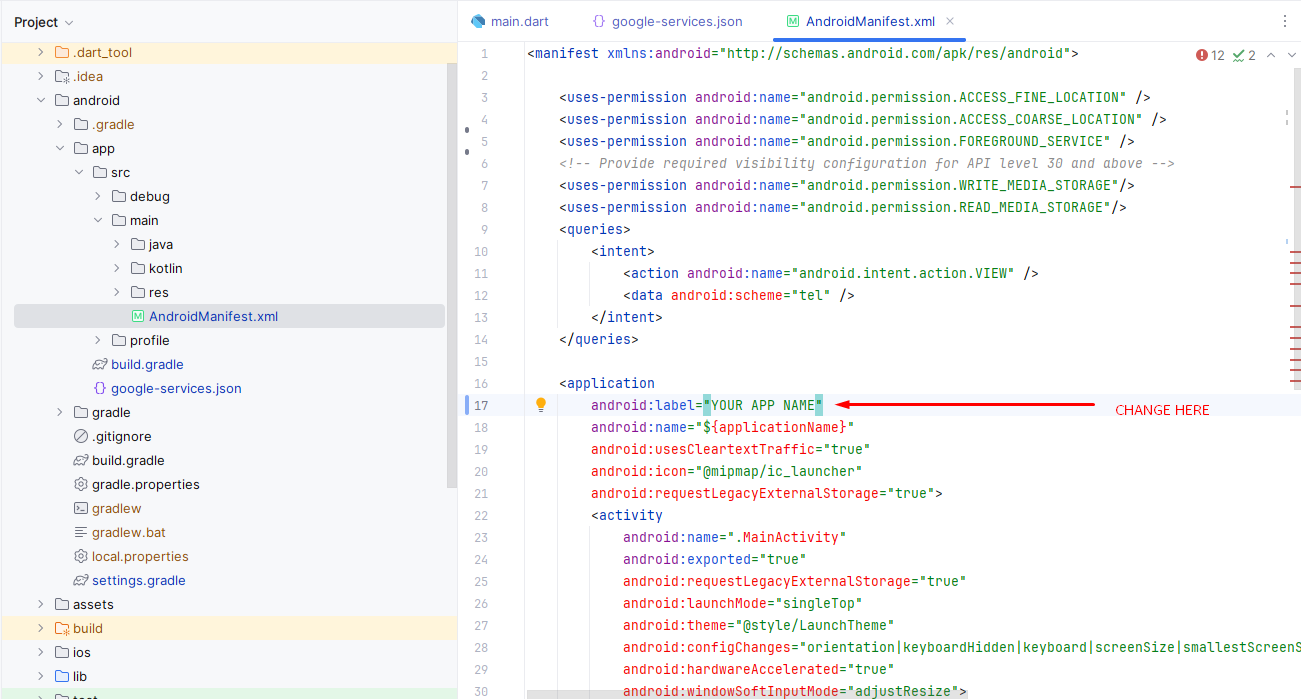
-
For Android:
- Open the Android project in Android Studio.
- Update the package name in
the `AndroidManifest.xml` file
located at
android/app/src/main/AndroidManifest.xml.
-
For iOS:
- Update the bundle
identifier in the `Info.plist` file located at
ios/Runner/Info.plist.
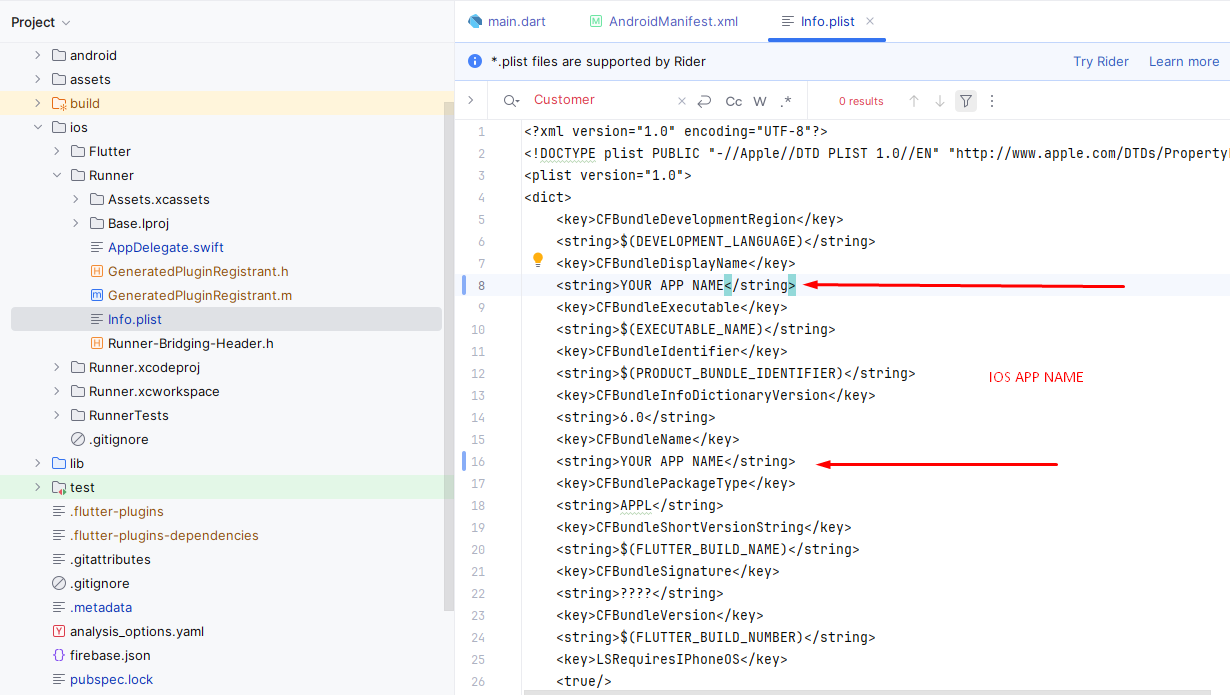
- Update the bundle
identifier in the `Info.plist` file located at
Change App Icon
App icon change overview
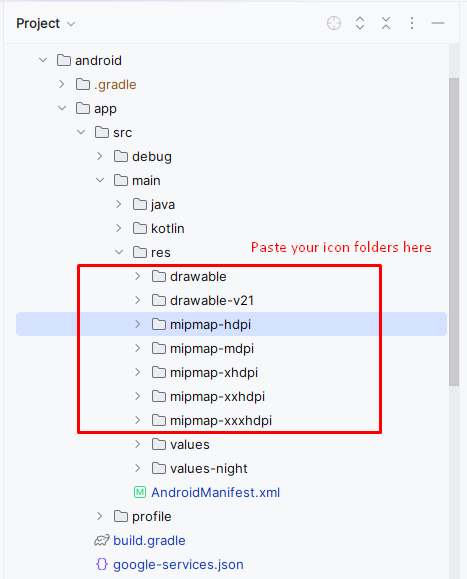
-
For Android:
- Prepare the icon images in various sizes (e.g., 48x48, 72x72, etc.).
- Navigate to the `res`
directory at
android/app/src/main/res/. - Replace the default icons
in the `mipmap-*` directories with your new app icon files
(e.g.,
mipmap-hdpi/ic_launcher.png). - Ensure that you follow the required naming conventions for different densities (e.g., `mipmap-mdpi`, `mipmap-hdpi`, `mipmap-xhdpi`, etc.).
- Update the icon in the
AndroidManifest.xmlfile if necessary.
-
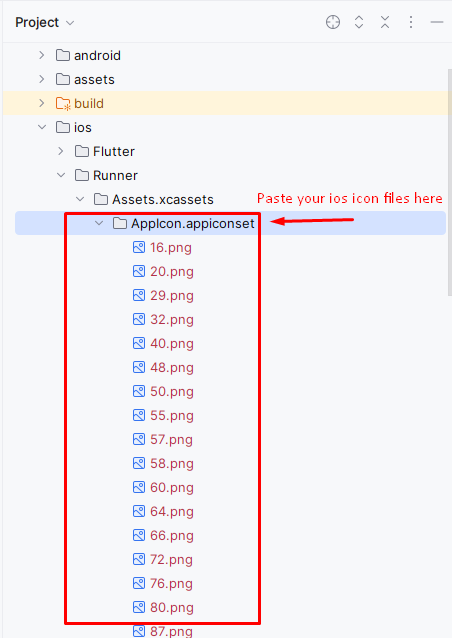
For iOS:
- Prepare the app icon images in multiple sizes (e.g., 60x60, 120x120, 180x180, etc.).
- Open the iOS project in Xcode.
- Navigate to the
Assets.xcassetsfolder in the project navigator. - Find the `AppIcon` set and drag your new icon images into the appropriate boxes for different sizes (e.g., 60pt, 120pt, etc.).
- Ensure that the icon set includes all required sizes for both iPhone and iPad.
Edit App Strings
Customize the display text across the app by modifying string values.
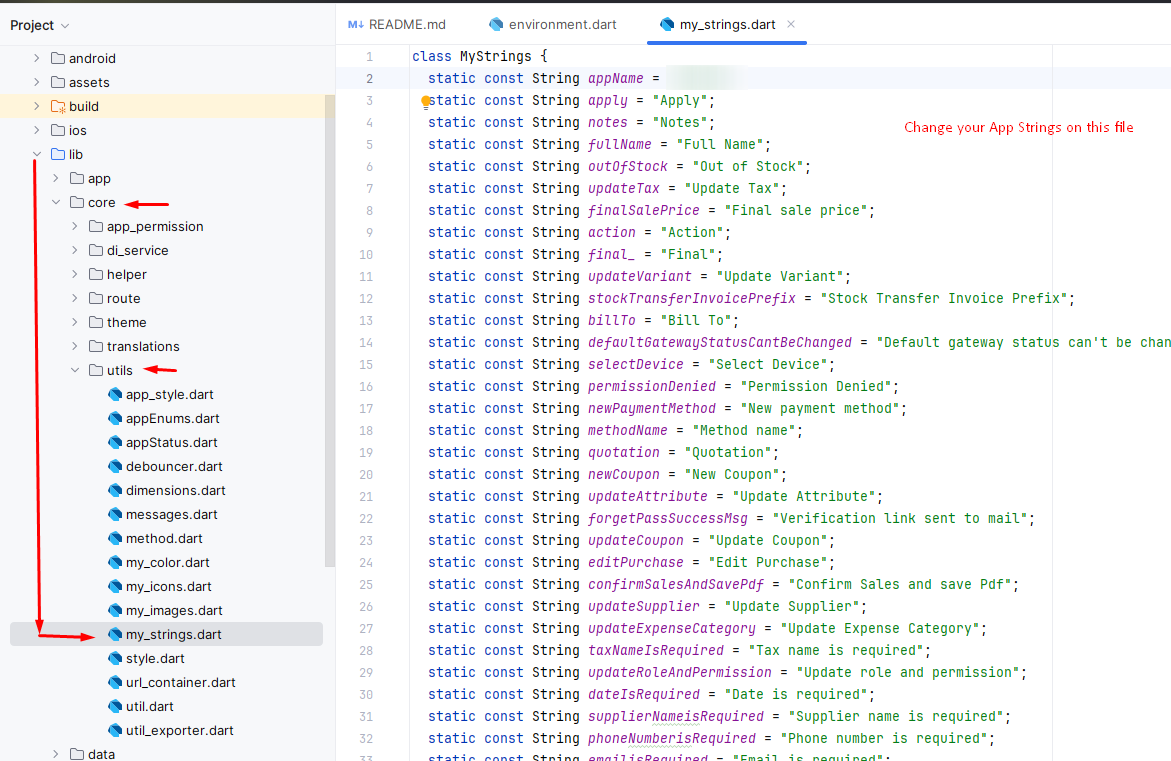
The app's strings are managed in the file located at:
lib/core/utils/my_strings.dart.
- Open
my_strings.dartin your preferred code editor. - Locate the string constants, which are typically organized for each screen or feature.
- Edit the text values as needed, and save the file to apply your changes throughout the app.
- Ensure you rebuild the app if required to see updates in the app UI.
Change Base URL
Overview of how to change the base URL for your app's API requests.
-
For Both Android and iOS:
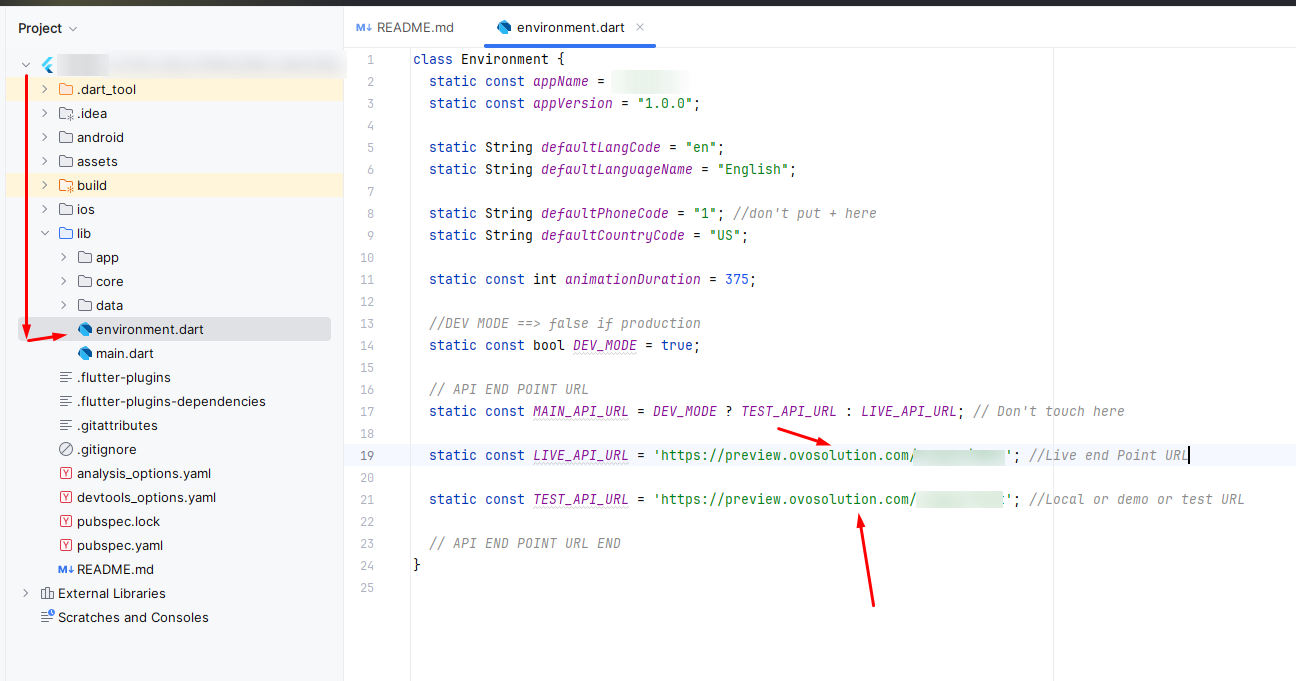
- Open the `lib` directory of your Flutter project.
- Locate the file that
manages your network configurations (e.g.,
lib\environment.dart). - In this file, define the
domain URL for your API requests (e.g.,
static const String LIVE_API_URL = 'https://yourapi.com';
static const String TEST_API_URL = 'https://yourapi.com';). - Ensure all network calls use this base URL for making API requests throughout the app.
Change App Color
Overview of how to change the app's primary and secondary color scheme.
-
For Both Android and iOS:
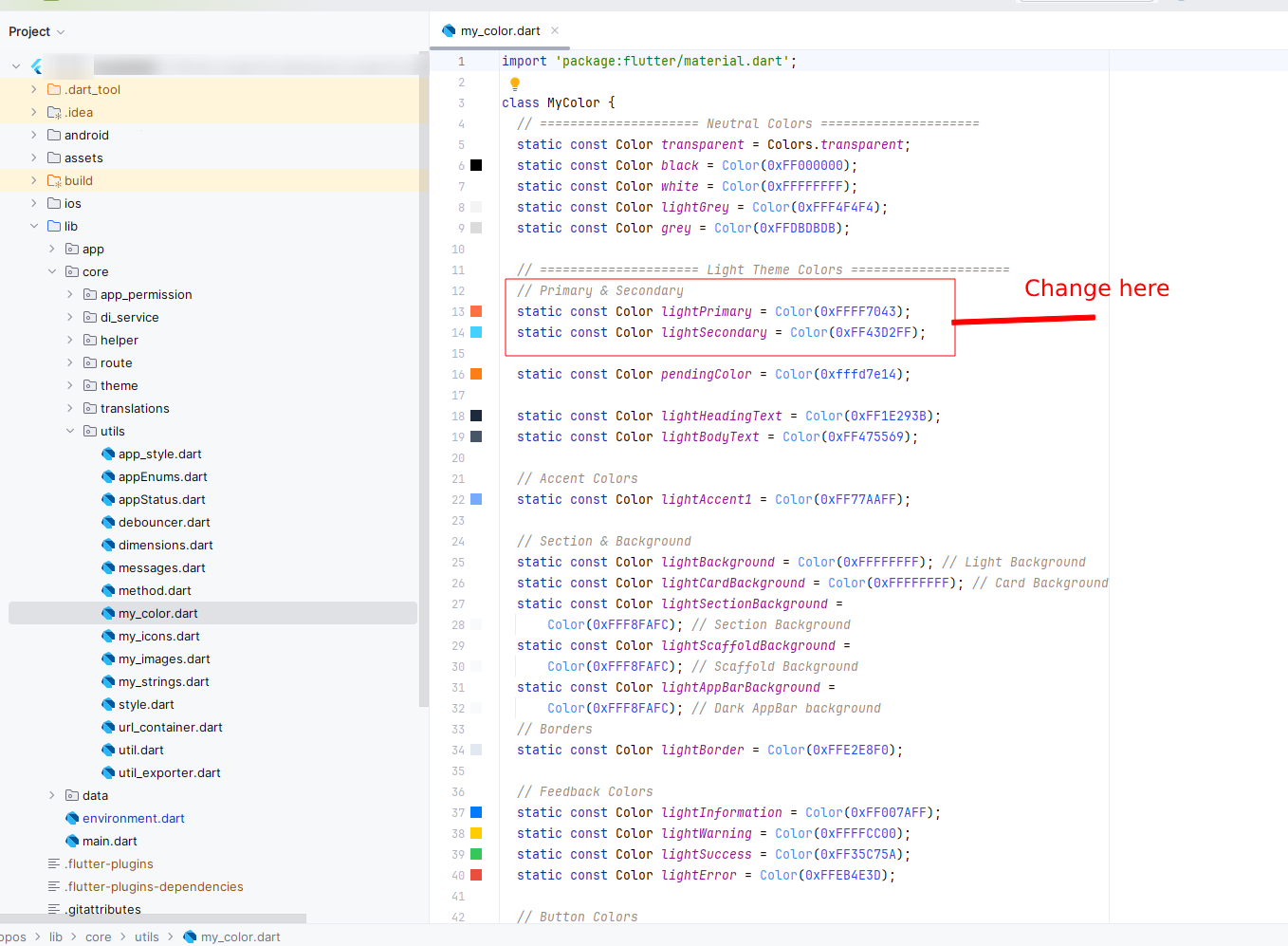
- Open the `lib` directory of your Flutter project.
- Navigate to your utils
folder (e.g.,
lib\core\utils\my_color.dart).
Change Package Name
Overview of how to change the package name for both Android and iOS in your Flutter app.
-
For Android:
- Open the Android project in Android Studio.
- Update the
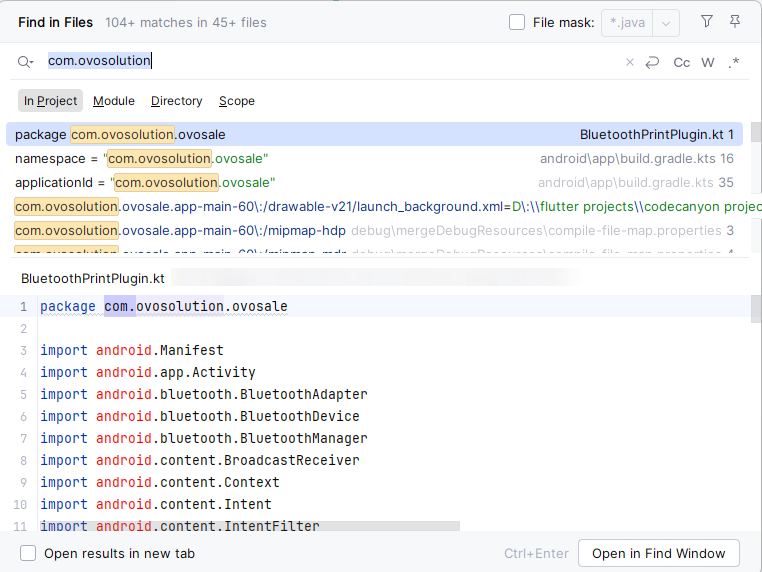
applicationIdin theandroid/app/build.gradlefile: - Right click on project folder and click on Replace in Files
defaultConfig { applicationId "com.ovosolution.ovosale" }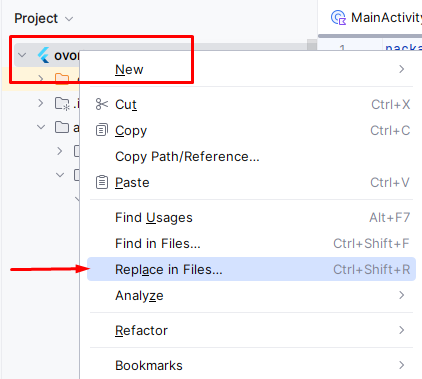
- Search com.ovosolution.ovosale in the first indicated box and your own package name in the second marked box. Then click Replace All button
How to Change App Logo in Flutter
Learn how to change the logo of your Flutter app by updating the logo image in the assets directory.
-
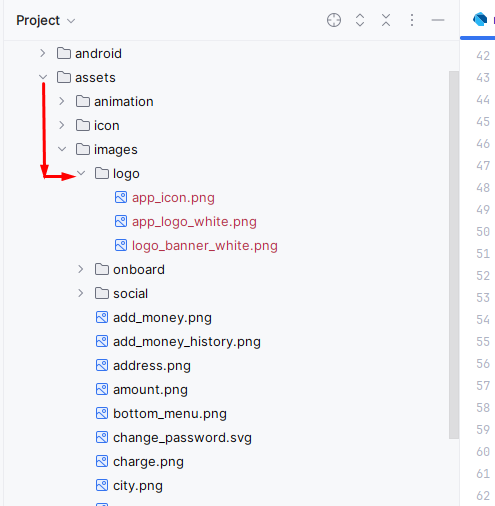
Step 1: Add Your Logo to the Assets Directory
- Create a folder inside the `assets` directory, called `images/logo`.
- Place your logo image files inside the `assets/images/logo` folder. For example: - `assets/images/logo/logo.png` - You can also include other formats like `.jpg`, `.jpeg`, or `.svg` depending on your preference.
Keystore Setup and Retrieving SHA-1/SHA-256 Keys
Learn how to generate a keystore and retrieve the SHA-1 and SHA-256 keys for your Flutter app.
Step 1: Generate Keystore
- Follow the official Flutter documentation to Build and release an Android app:
- Or Open a terminal or command prompt and navigate to a folder where you want to save your keystore.
-
Run the following command to generate a keystore:
keytool -genkey -v -keystore your_keystore_name.jks -keyalg RSA -keysize 2048 -validity 10000
-
You will be prompted to enter the following details:
- Your name and organization details
- A password for the keystore
- A password for the key alias (can be the same as the keystore password)
- After successfully running the command, you will have a file named `your_keystore_name.jks`.
Step 2: Add Keystore to Your Flutter App
- Place the keystore file (`your_keystore_name.jks`) in the `android/app` directory of your Flutter project.
-
Edit the `android/app/build.gradle` file and add the keystore configuration
under the `android {}` block:
android { ... signingConfigs { release { keyAlias 'your_key_alias' keyPassword 'your_key_password' storeFile file('your_keystore_name.jks') storePassword 'your_keystore_password' } } buildTypes { release { signingConfig signingConfigs.release minifyEnabled false shrinkResources false } } }
Step 3: Retrieve SHA-1 and SHA-256 Keys
- Open a terminal or command prompt.
-
Run the following command to get the SHA keys:
keytool -list -v -keystore your_keystore_name.jks
- Enter the keystore password when prompted.
-
The output will include the SHA-1 and SHA-256 keys under the certificate
details. For example:
Certificate fingerprints: SHA1: 12:34:56:78:90:AB:CD:EF:12:34:56:78:90:AB:CD:EF:12:34:56:78 SHA256: AB:CD:EF:12:34:56:78:90:AB:CD:EF:12:34:56:78:90:AB:CD:EF:12:34:56:78:90:AB:CD:EF
Support
How to get assistance
Thank you for purchasing our product! For any support or assistance, feel free to reach out to us via the provided email address. Our dedicated support team is available 24/7, ready to help with any questions, technical issues, or inquiries you may have. We are committed to providing prompt and reliable assistance to ensure a seamless experience with our product. Your satisfaction is our priority, and we are here to support you every step of the way.